

Social media can be an effective way to connect with potential customers. But as your presence grows across different platforms, managing content can quickly become time-consuming and inefficient. Social media management platforms can help streamline scheduling and provide performance insights. However, there are a lot of options. Let’s compare a few social media management platforms, including their features, pricing, and more.
Comparing the Top 7 Social Media Management Platforms
The right social media platform can help you save time, build consistency across your brand, and optimize performance. The right platform should also be cost-effective and give you the tools you need without overcomplicating things. But, there are dozens, maybe hundreds, of social media management platforms to choose from, and it can be difficult to know where to start.
We chose 7 social media management platforms and took a closer look at their features, pricing structures, and highlights. These are by no means the only social media management platforms, and others not on this list may be best for you. We chose this selection because of their well-known names, usage by prominent businesses and agencies, and the notable discussion around them, not necessarily because they provide a better experience. If one of these sounds right for you, it may make sense to continue your search and find other platforms that are similar to it—you may find another, similar platform that’s an even better fit!
No Affiliate Links Used in This List
Note that while we at Web Ascender may use or have tested some of these platforms, we receive no compensation or incentive to include any links or feature any platforms. In general, we do not respond to requests for features, or incentives of this sort. The summaries provided about each platform are derived largely from the platform’s own websites, our own assessments, and some additional research. We encourage you to use this list as a starting point, and to make your own conclusions based on your preferences and needs.
1. Hootsuite: Many Features, High Cost, Better for Larger Marketing Agencies
Hootsuite is one of the oldest and most well-known names in social media management. It’s built to handle large-scale operations, making it a popular choice for enterprises and agencies managing dozens or even hundreds of accounts.
The platform offers robust scheduling, analytics, and team collaboration features, along with integrations that allow it to fit into broader marketing ecosystems. However, it may feel a bit heavy for smaller teams, and will probably offer a lot of features that smaller organizations don’t need. Its depth makes it a powerful option for organizations that need full control and visibility.
With Hootsuite, you can integrate other tools like Canva and Adobe Express, and use a content library and media editing to help create or develop your posts. You can also monitor and analyze the sentiment around your brands and keywords, generate reports and access dozens of tools to help your team work together better. There’s also AI assistants for a wide variety of tasks that can help save time.
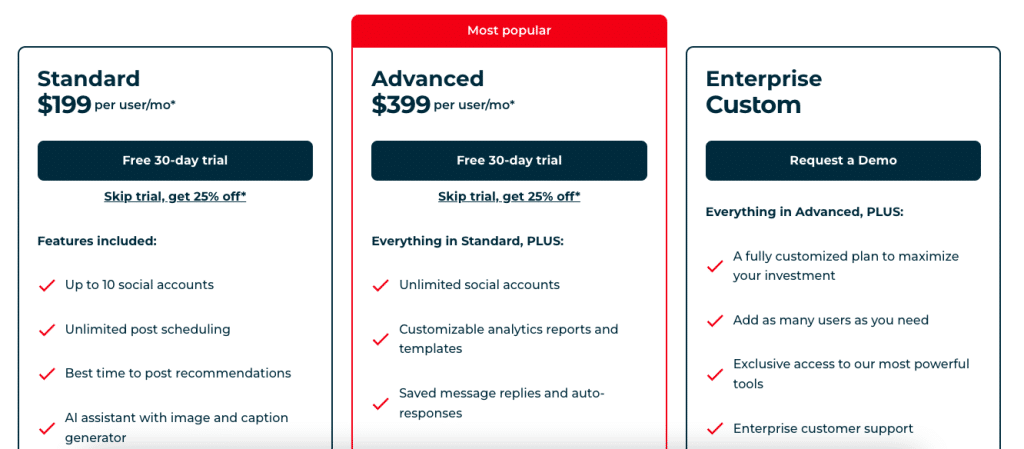
Hootsuite starts at $199 per user, per month and gives you a lot of features, but might be steep for many teams. If you don’t need quite so many tools and features, a lighter-weight software might make more sense.
Key Details:
- Pricing structure: starts at $199 per user, per month.
- Features: Scheduling, analytics, social listening, team workflows, integrations and more
- Unique features: Advanced social listening and enterprise-level controls
- Key audience: Large teams, enterprises, high-volume agencies
- Advantages: Scalable, feature-rich, widely supported
- Disadvantages: Higher cost, steeper learning curve
2. Sprout Social: Robust Features, High Cost, Also Good for Large Agencies
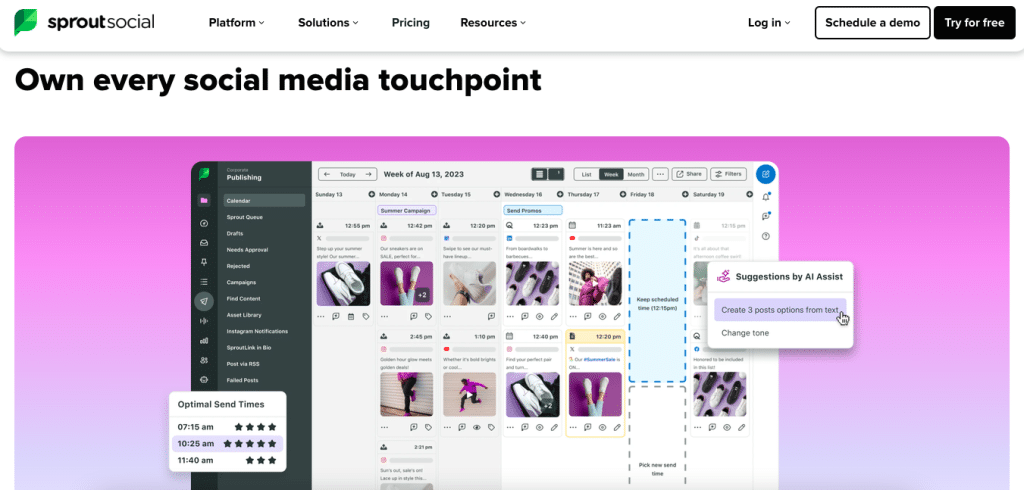
Sprout Social is known for its polished interface and industry-leading analytics. It’s a strong choice for organizations that want deeper insights into performance, engagement, and audience behavior.
In addition to scheduling and publishing, Sprout offers a “smart inbox” that consolidates messages across platforms, as well as CRM-style features that help teams track interactions with followers. It’s particularly appealing to brands that prioritize data-driven decision-making.
Like the previously mentioned Hootsuite, Sprout Social offers a wide variety of tools, integrations, and features. You’ll get sentiment analysis and keyword monitoring, alerts, an asset library, content suggestions, suggested optimal post times, report generation, AI support for each task, and more. These two platforms are very similar, and seem to offer many of the same features.
Key Details:
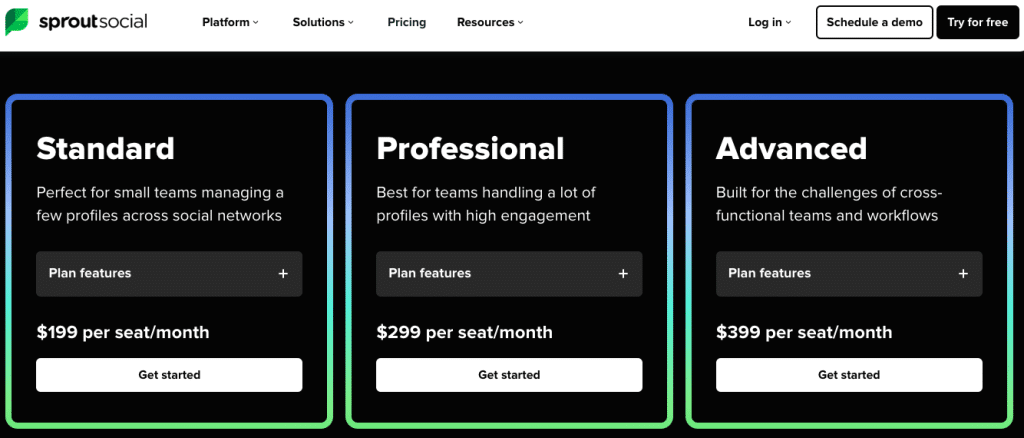
- Pricing structure: Starting at $199 per person, per month
- Features: Scheduling, analytics, engagement tracking, reporting
- Unique features: Smart inbox and advanced reporting dashboards
- Key audience: Mid-to-large businesses focused on analytics
- Advantages: Excellent reporting, clean UI, strong engagement tools
- Disadvantages: Expensive, may be overcomplicated for smaller businesses or agencies
3. Buffer: Lightweight, Flexible, Great for SMBs and Agencies

Buffer is a more streamlined approach to social media management. It’s designed for simplicity, making it a great fit for smaller teams that want to stay consistent without dealing with complex workflows. The platform focuses primarily on scheduling and publishing, with light analytics included. While it doesn’t offer the depth of the previous tools, its ease of use and affordability make it a go-to option for many growing brands.
The lightweight functions should serve most small and mid-sized businesses and agencies well. Buffer gives the ability to create and schedule posts across the most popular platforms, make comments, import content from Google, Dropbox, or Canva, connect RSS feeds from other sites, and gives you an AI assistant to help polish or repurpose your work. You can also check the performance of your accounts and posts across key metrics, and easily generate reports.
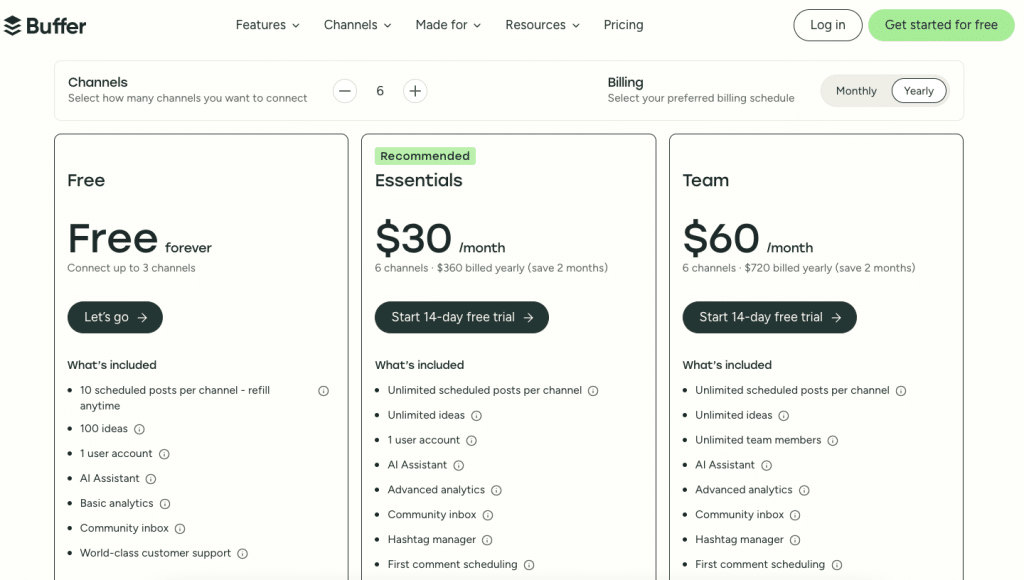
The pricing structure differs from many of the other social media management platforms in our comparison. With the ability to price based on the channels you manage and user access, Buffer may offer the most flexibility, and may also be the most cost-effective for most agencies and businesses.
Key Details:
- Pricing structure: Connect up to 3 channels with 1 user for free, with each additional channel adding $5/month or $10/month, depending on functionality and user access.
- Features: Scheduling, publishing, basic analytics
- Unique features: Simple and intuitive interface
- Key audience: Small businesses, startups, lean marketing teams
- Advantages: Easy to use, affordable, quick setup
- Disadvantages: Limited advanced features and reporting
4. Later: Focused on Video, Images, and Influencers, Better for Consumer Products
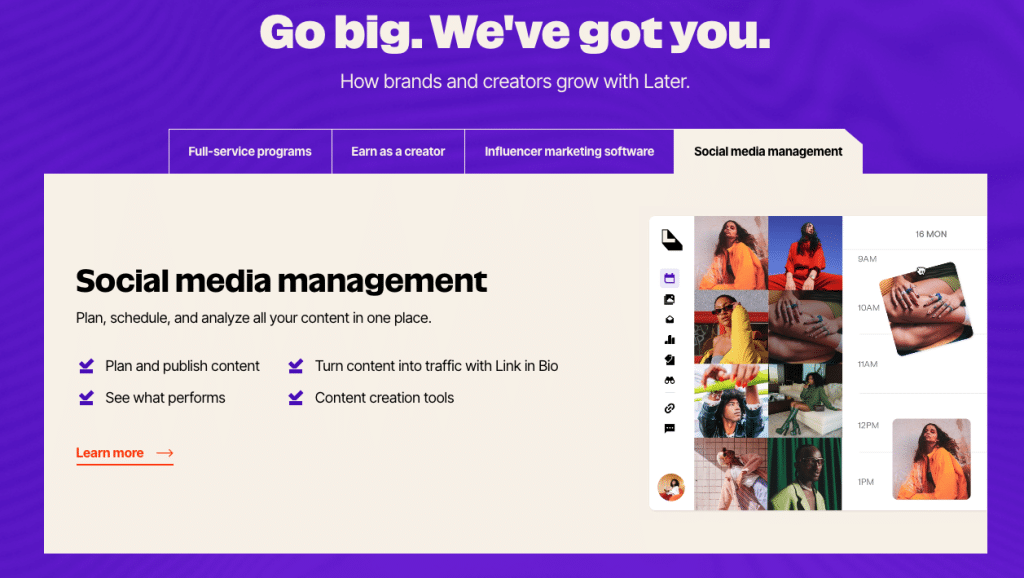
Later bills itself as “Influencer marketing built for creators, trusted by brands, and designed for results.” This platform is built with video and images in mind, making it especially popular among brands that rely heavily on Instagram, TikTok, and Pinterest. Its drag-and-drop content calendar allows teams to plan posts visually, which is ideal for maintaining a cohesive brand aesthetic.
Beyond scheduling, Later also offers tools like a link-in-bio feature and hashtag suggestions, helping brands optimize their social presence and drive traffic. The platform also offers fully managed campaigns, including content production, strategy, and partnerships with key creators. The social media management side offers a set of key features, including post scheduling, analytics, custom “link in bio” pages, and basic editing features for content creation.
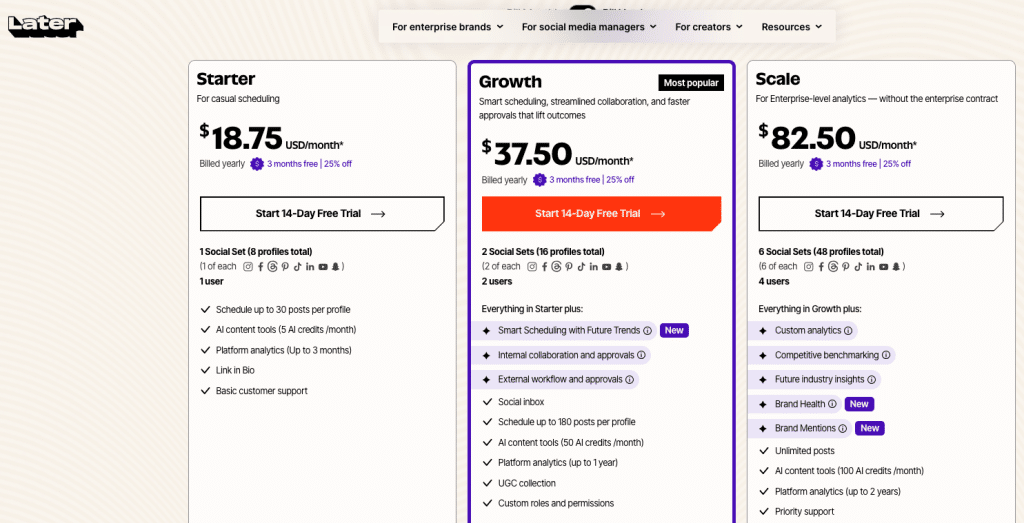
Later’s pricing structure offers flexibility; starting at $25 per month (cheaper with annual billing), small teams can add 8 social media profiles and 1 user to manage them, while working within caps for posts and content assistance. The mid-price tier offers 16 social media profiles (2 “social sets”) and 2 users, with the ability to add extra users, profiles, and AI credits for additional cost for $50 per month (cheaper with annual billing). The last tier offers 6 “social sets” and 4 users with additional features and the ability to add more team members and accounts for additional cost.
Key Details:
- Pricing structure: One user managing 8 profiles starting at $18.75/month when billed annually, with additional tiers adding users, profiles, posts, and features.
- Features: Focus on images and videos, media library, analytics, link-in-bio
- Unique features: Drag-and-drop visual planner
- Key audience: eCommerce brands, influencers, video-first teams
- Advantages: Excellent for video planning, strong Instagram tools
- Disadvantages: Less robust for non-video platforms
5. Agorapulse: Robust Functionality at a Lower Price Point for Mid-Sized Businesses or Agencies
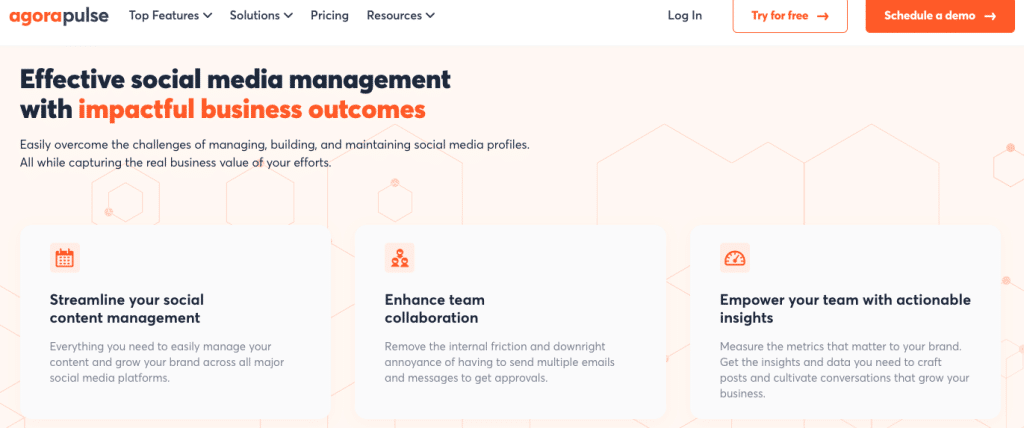
Agorapulse provides robust functionality at a lower price point than some of the other more complex platforms, making it a strong contender for mid-sized agencies and marketing teams. It offers scheduling, reporting, and a unified inbox without the complexity of larger enterprise platforms.
One of its standout qualities is how approachable it is, allowing teams can get up and running quickly while still benefiting from meaningful insights and collaboration tools. Agorapulse offers many of the content creation tools of the other platforms, including an AI assistant and Canva integration, as well as social listening and monitoring functions for your brand and competitors, team collaboration, scheduling features. The platform’s ability to set up tracking around trends, keywords, and companies seems to stand out, allowing social media managers to jump into the conversation at critical moments.
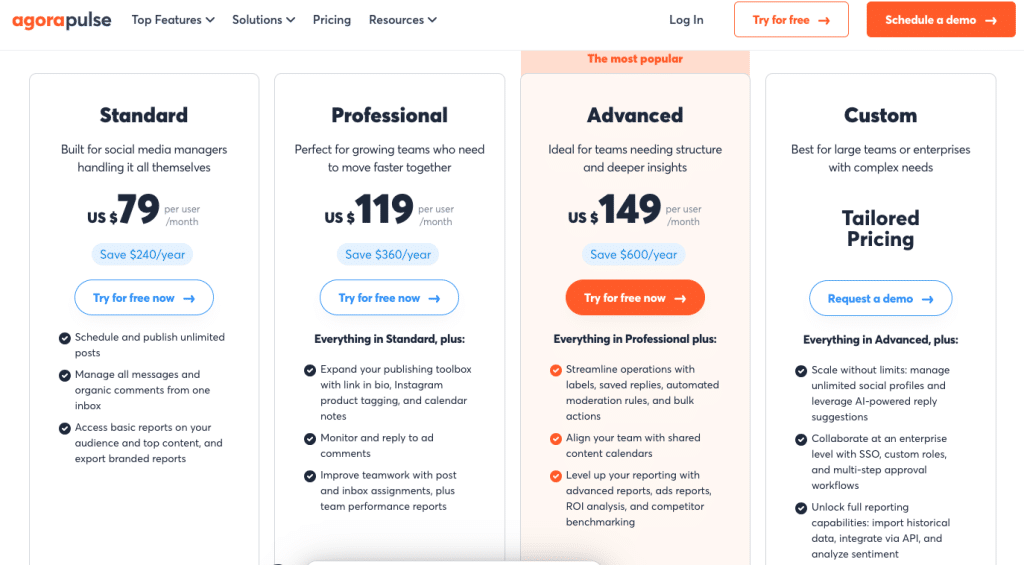
Starting at $79 a month (paid annually), the platform’s pricing seems more affordable than the previously mentioned Hootsuite and Sprout Social, but may also be a bit more complex. Each tier is limited to 10 social profiles, but provides unlimited posting capability. It’s unclear how many users gain access at each tier level, and many functions aren’t available at the first and second tiers, so it may be important to assess which functions you need in detail upfront.
Key Details:
- Pricing structure: Starting at $79/month, paid annually, with more features available at higher tiers.
- Features: Scheduling, reporting, social inbox, team collaboration
- Unique features: Built-in ROI tracking and competitor analysis
- Key audience: Agencies and mid-sized marketing teams
- Advantages: Well-rounded, user-friendly, strong value
- Disadvantages: Fewer enterprise-level features than top-tier tools
6. Sendible: A Range of Functions with Capabilities for Larger Agencies
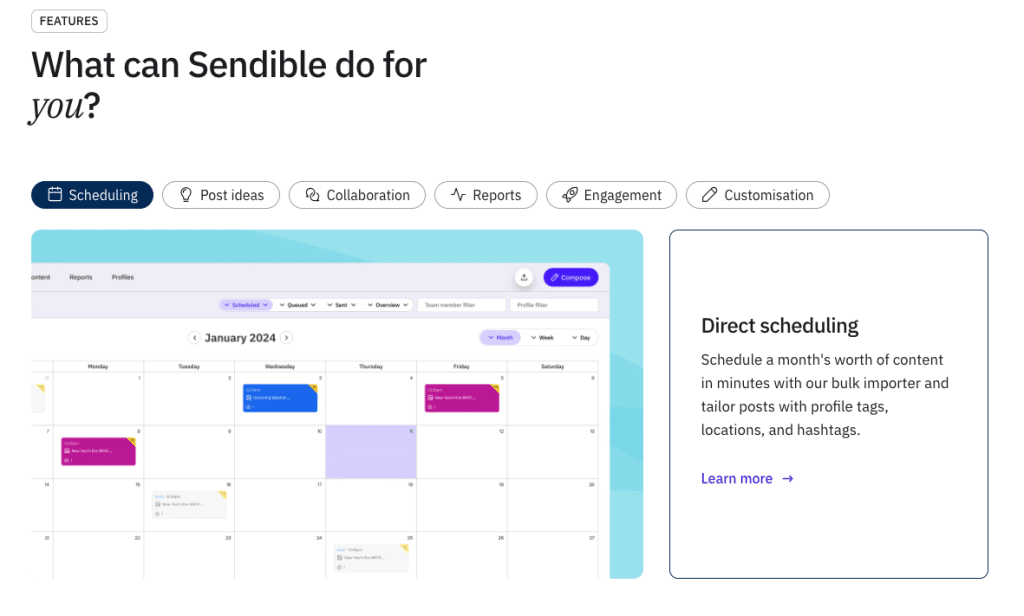
Sendible offers a range of features and flexible options for agencies and businesses of different sizes. Its flexibility and agency-focused tools make it a strong option for teams that need to manage multiple brands while maintaining a professional, client-facing experience.
This platform provides a variety of features for both small and large businesses and agencies, including scheduling and posting to the most popular platforms, basic video and photo editing, AI assistance, and content libraries for higher-tier plans. With the ability to integrate with Google Drive, Dropbox and Canva, you can bring in your assets from elsewhere.
Some team collaboration and conversation monitoring features are missing, however, especially at lower tiers. While basic reporting features are available, more detailed reporting features seem to be limited, especially for the first two tiers.
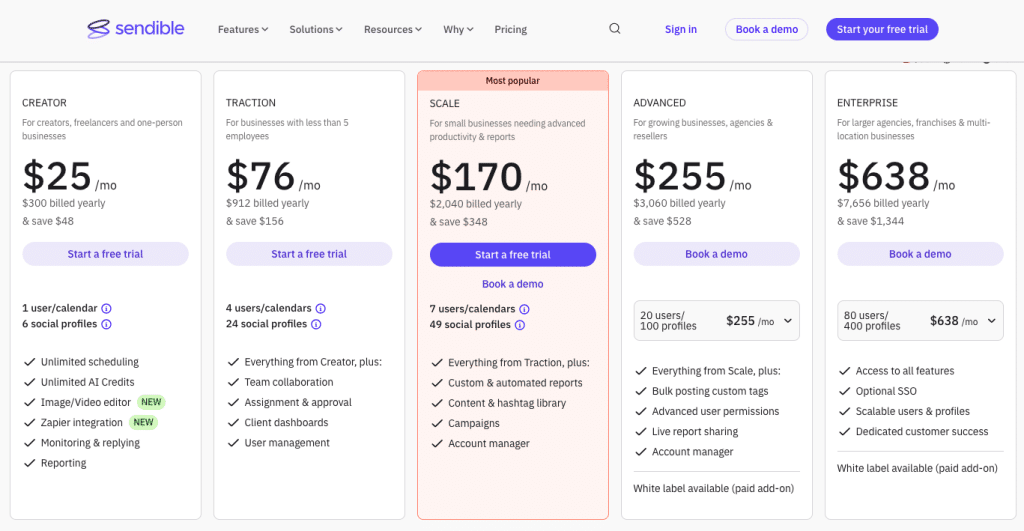
Starting at $25 a month for one user, 6 social profiles and more limited features, the first tier doesn’t stack very well against the introductory tiers of some of the other platforms. However, the upper tiers allowing access for more users, with many more social profiles and more features are more competitive.
Key Details:
- Pricing structure: Starting at $25/month with one user and 6 social profiles, and expanding up to $638/month with up to 80 users and 400 profiles
- Features: Scheduling, reporting, content suggestions, integrations
- Unique features: White-label dashboards and client reporting
- Key audience: Marketing agencies managing multiple clients
- Advantages: Agency-friendly, strong reporting, flexible integrations
- Disadvantages: Can feel complex for smaller teams
7. Canva: Robust Content Creation with Limited Monitoring Features
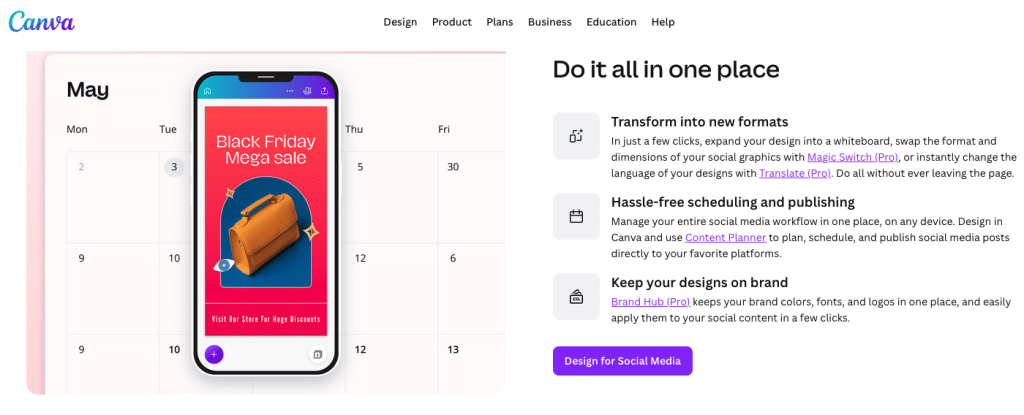
With a variety of easy editing tools, templates, and a large content library suitable for images, videos, and text across nearly any platform, Canva has quickly become the go-to platform for many businesses and digital marketing agencies. If you’re already using Canva Pro or Business for content creation, its social media scheduling features are already built-in. Utilizing the features already available might help you save money for other resources, streamline your tech stack, and save time spent clicking between different platforms.

The highlight of Canva is surely its content creation capacity, however it also offers an expanding set of adjacent tools, including social media scheduling and a content planner. Since it’s not the focus of the platform, it’s unclear how many profiles you can connect, though it does seem to support a variety. The analytics available are also unclear, and it may require integration with another platform, though many integrations are available.

If you’re already using Canva Pro or Business for content creation and you need a set of simple scheduling tools, the content planner may be the perfect option. Generating reports and data may require additional tools, but this option may simplify your regular scheduling and creation process.
Key Details:
- Pricing structure: An extensive free version, $15/month for Pro and $20/month for Business with extra features and content available at each tier.
- Features: Extensive content creation and editing, with simple scheduling
- Unique features: Huge content library and templates
- Key audience: Marketing agencies and businesses with simple social media needs
- Advantages: Strong content creation tools
- Disadvantages: Simple scheduling and reporting features
Choosing the Right Social Media Management Platform
Ultimately, the best social media management platform for your business depends on your needs and preferences. The number of accounts you manage, the type and volume of content you publish, and the level of insight you require all play a role in determining the right fit. By understanding what matters most to your team, you can choose a solution that improves and streamlines your overall social media strategy.