


Maybe you’ve thought about putting your business online for the first time, and you’re not sure where to start. Or, maybe you want to create a completely new site, but you’re not sure how to make those changes. These 4 questions will help you organize your information and make it easy to wireframe your new site.
What is a Website Wireframe?
First, what is a website wireframe? A website wireframe is essentially a blueprint or prototype of your website. Your wireframe will show which pages your website will have, what information you’ll include on each one, and the layout of each page.
You might ask, why not just start building the site itself? Building a website without a wireframe risks making your site disorganized; you’re more likely to leave out important pages, duplicate others, or make it more difficult to connect your pages. With an organized wireframe in place, your pages, content, and layout will be established, so you can focus on design elements, security, and functionality when you build your website.
With this in mind, a good website wireframe should:
- Show which pages will be included on the site
- Show the images, videos, text, and other content on each page
- Give viewers an idea of the site’s layout and how the content will be arranged
- Provide a format to review and change the content before the full site build-out
- Show the site’s organization and how pages will be arranged
Not sure how to attack your new website?
Get some pro tips from the experts >>
How to Build a Website Wireframe
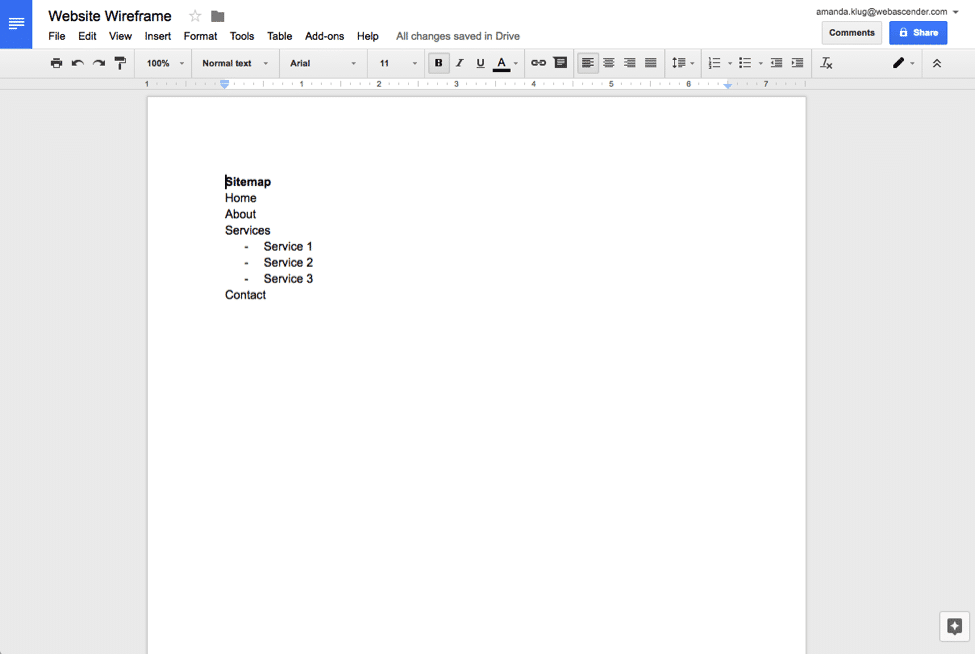
Tools like Google Docs make it easy to create a sitemap and wireframe that you can easily edit and adjust.
How can you build a website wireframe? What does a good website wireframe look like? There are many ways to go about this, and you should choose the method that works best for you.
It’s easy to make a great website using a program like Google Docs. Using simple elements like tables, bulleted lists, and text, you can map out your content, insert images in the right place, or denote place-holders. Many other programs can work in similar ways, from programs like Adobe’s InDesign and Photoshop to alternative, free programs like Canva or Gimp. Many other programs can also work. You should use whatever program is most comfortable for you.
If you’re not comfortable with programs like these, you can also use paper, pencils, or a whiteboard. Though it can be more difficult to move small text or images into the right place, or make adjustments on the fly, this can be the right choice if you’re more comfortable with it.
4 Questions to Wireframe Your Website Like a Pro
Professional web designers and developers use these questions to build organized wireframes and set up streamlined, modern websites. These questions help to set the stage for the content on the site, and also set up great web design elements. You can use these 4 questions to wireframe your website like a pro, too.
1. Who Are Your Competitors?
Before diving into your website wireframe, it’s helpful to do a bit of research first. This will help you decide what pages to include, how your website should look, and how you might expect your customers to navigate it.
First, who are your competitors? These might be direct or indirect competitors. For example, you might search for businesses similar to yours in another location. Or, you might search for a similar business that caters to a different audience.
Take a close look at your competitors’ websites. What do they have in common? What pages do they each include? How does their website reflect their brand? Look at elements like font choice, images, and colors. Take a look at the text as well, and consider the tone and personality it reflects.
Consider taking notes as you look through your competitors’ websites, so you can look back on this as you start to assemble your own web page layouts and content.
2. What Other Websites Inspire You?

Sites like Awwwards and Template Monster give you an array of creative web design templates to peruse.
Once you’ve taken a look at your competitors and assessed some industry standards, it’s time to look at websites that inspire you. These might be websites that you find visually appealing, those that you think are very efficient and easy to navigate, or they stand out for another reason.
Note that the websites that inspire you might also be your competitors. Others might be quite different from your industry. If the websites that inspire you are very different from your industry and you don’t see your own business website successfully emulating these sites, consider the specific elements that inspire you. Do you like the layout? The organization? The images? The videos? You may be able to emulate these elements and make them applicable to your business.
There are many other places to look for website design inspiration, too. You might even look at websites of neighboring businesses, or businesses that you like to buy from or visit. Keep in mind, however, that larger businesses will have bigger web design budgets, and might be able to use more complex features.
3. What Is Your Website’s Purpose?
The next important question to wireframe your business like a pro is, what is your website’s purpose? Consider what you want your website to accomplish, and who your website is for.
- Shopping: Maybe you want to set up an online shop to sell your products.
- First Impression: Your website can serve as your first impression for customers who are considering visiting or shopping with you.
- Information: Your website can provide detailed information and position your business as an industry leader.
- Digital Marketing: With a digital marketing strategy, you can set up landing pages and use ads and social media to steer potential customers towards a lead magnet.
Your website may accomplish many of these things, and many others. For your wireframe, consider one or, maximum, two things you want your website to do. Then, you can build pages and content around these priorities.
Struggling with your website or wireframe?
We can help!
4. What Pages Do You Need?

Determine what information you want to convey, and consider how you will arrange this across your different webpages.
The previous research and information you’ve compiled will now help you decide what pages you need. A few other steps will also help you refine this process and start to build out pages on your wireframe.
What information do you want and need to convey? What do your potential customers want to know? Maybe you already have this information written in an old website, a brochure, or other marketing materials. If you have a lot of information, put yourself in your customers’ shoes and consider which information is likely to be more important to them.
Conversely, if you feel like you don’t have much information to convey, it’s okay to make a fairly simple wireframe. The following pages are used in most websites, regardless of industry, and this can be a great place to start.
- Home: This is your central page, and should provide an overview about your business and website. This page should link to your other pages, so customers can easily explore your website and find the information they need.
- About: This page should explain more about your business. It might include how the business was founded, who leads or works at the business, and your mission and values.
- Products/Services: At least one page should be dedicated to your products or services. Other pages might nest under this page, so customers can click through to more specific products or services.
- Resources: This page might include a blog, newsfeed, whitepapers, or other information a customer might access to learn more about the business, products, or services. These pages can also be an important part of an organic SEO strategy.
- Testimonials: This might also be called “case studies” or something similar. It should include profiles of your customers, reviews, or testimonials they’ve provided. This shows your prospective customers that they can rely on your business, and many others already do.
- Contact us: If customers have questions or if others need to contact you, they should be able to. This page should show how they can reach you and where your business is located.
Consider the pages you observed on your competitors’ sites. Also, consider how you want to arrange important information on your site. Depending on what you observed from industry standards and what’s important to you, you might create separate pages for your mission statement, for example. Or, if digital marketing is important to you, you might create a variety of landing pages that will resonate with your customers.
Get Started!
With these questions answered, you should have a good idea of what your website should accomplish, what pages it should have, how it should look compared to industry standards, and how you want to lay it out. Now it’s time to get started!
Start by making a sitemap. At the wireframe stage, this is essentially just a list of pages. Then, start mapping out your headings, subheadings, and where different sections of text will appear, as well as images and videos. Your homepage wireframe will be unique, but many of your other pages will likely be similar to each other in their layout. To save time, you can copy and paste this layout once you’re happy with it, and fill in unique content in different sections.
These 4 simple questions can help you get started and wireframe your business website like a pro. After this exercise, your actual wireframe will be much easier to complete, which will set you up to create an excellent website. If you’re not sure how to tackle your website, or your wireframe is turning out to be more complicated than you expected, contact the web design and development experts.