
Deadlines for ADA website compliance are approaching quickly for many public entities. With new federal requirements taking effect on April 24, 2026 and April 26, 2027 (for smaller entities), state and local governments are expected to make their digital services accessible to all users.
If you’re responsible for managing a municipal, county, or state website or software system, this raises some important questions about compliance. Let’s take a look at the updated ADA Title II rules and how your organization can prepare.
ADA Title II and Your Government Website
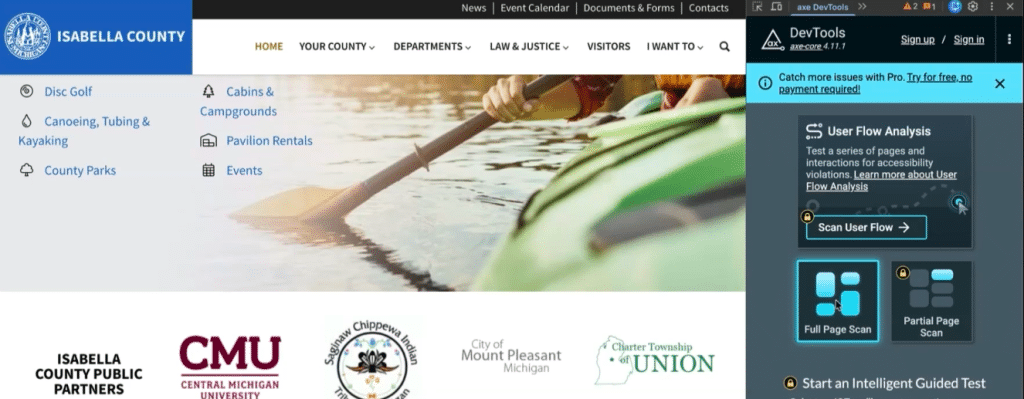
Testing tools like this one can scan your site or pages of it and detect accessibility issues.
The Americans with Disabilities Act (ADA) has evolved over several decades and was established to ensure that individuals with disabilities have equal access to public life, including government programs and services. Title II of the ADA specifically applies to state and local governments, requiring that everything from public meetings to essential services be accessible to all.
For years, that expectation of accessibility extended to websites, but without clear technical direction. Many organizations were left guessing, often leading to inconsistent implementation. That changed in 2024, when the U.S. Department of Justice finalized new rules that directly address websites and mobile applications. These updates formally define what accessibility looks like online and, just as importantly, establish firm deadlines for compliance.
Concerned about ADA compliance?
We can help. Get in touch >
What Is Required?
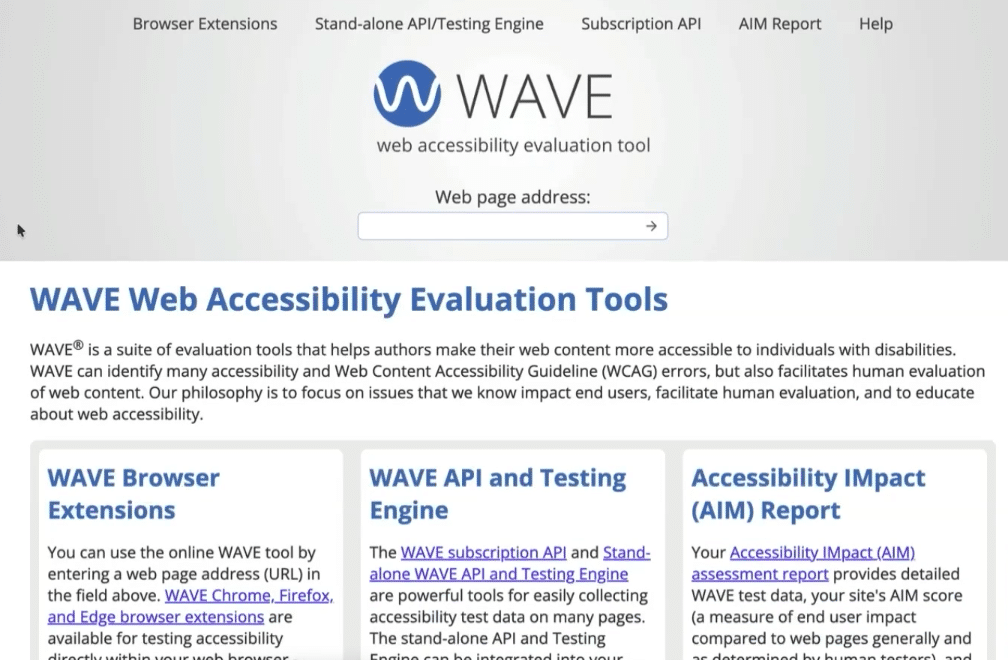
WAVE is a free accessibility testing tool that can help you find issues on your site.
At its core, web accessibility is about making sure people can actually use your website, regardless of their abilities or circumstances. That includes individuals with visual, auditory, motor, and cognitive disabilities, but it also extends to more everyday situations that affect how people interact with digital content.
For example, someone with low vision may rely on screen magnification or a screen reader to navigate your site. A user with limited motor control might depend entirely on a keyboard instead of a mouse. Someone who is deaf or hard of hearing needs captions to understand video content.
Accessibility requirements and adaptations may apply to any of the following disabilities (note that this list is not exhaustive):
- Visual disabilities: blindness, low vision, color blindness
- Auditory disabilities: deafness or hard of hearing
- Motor disabilities: limited mobility, tremors, paralysis
- Cognitive disabilities: dyslexia, ADHD, memory impairments
WCAG 2.1 Level AA
The DOJ now requires the websites of public entities to meet WCAG 2.1 Level AA standards. WCAG, or Web Content Accessibility Guidelines, is an internationally recognized framework that outlines how to make digital content more accessible.
There are three levels within WCAG: A, AA, and AAA. Level A covers the most basic accessibility requirements, while Level AAA represents the highest and most rigorous standard. Level AA sits in the middle, addressing the most common and impactful accessibility barriers without becoming overly restrictive.
These are the basics of the different WCAG levels:
- Level A: Basic accessibility requirements. This is the minimum baseline in many applications.
- Level AA: Addresses the most common and impactful barriers. This is the level required under ADA Title II.
- Level AAA: Highest level of accessibility. This is generally not required and often not practical for all content.
By adopting Level AA as the requirement, the DOJ has effectively created a clear, achievable benchmark for public entities. It ensures a meaningful level of accessibility while still being practical for organizations to implement and maintain.
Web Ascender has helped state and local governments at every level rework and refresh their websites.
Get in touch to learn more >
WCAG 2.1 AA Principles
So, what does this mean for your website? What functionality or changes are necessary to achieve WCAG 2.1 AA accessibility? Here’s a basic breakdown of WCAG 2.1 AA accessibility principles according to the W3C Web Accessibility Initiative:
- Perceivable: “Information and user interface components must be presentable to users in ways they can perceive.” This includes features like captions and audio descriptions for media, acceptable color contrast, resizeable text, and elements that can be interpreted by a screen reader or similar device.
- Operable: “User interface components and navigation must be operable.” This includes elements required to navigate the site, such as menus, headings, labels, links, and the ability to move with a keyboard.
- Understandable: “Information and the operation of the user interface must be understandable.” This includes the predictable and intuitive use of the site, such as with navigation elements, identifiers, and error suggestions.
- Robust: “Content must be robust enough that it can be interpreted reliably by a wide variety of user agents, including assistive technologies.” This includes the compatibility with assistive technologies like screen readers.
What Are the Deadlines?
The timeline for compliance is partially based on the size of the population your organization serves, which helps account for differences in resources and complexity.
Here are the two deadlines for compliance that you’re most likely to need:
- April 24, 2026: Public entities serving 50,000 or more people
- April 26, 2027: Public entities serving fewer than 50,000 people and special districts
These requirements apply broadly across state and local government organizations. Cities, counties, public schools, libraries, and state agencies are all expected to meet these standards. If your state or local organization provides information or services through a website or mobile app, it likely falls within scope.
It’s also worth noting where these rules do not apply. Private businesses are governed under a different section of the ADA, and while accessibility is still important in those cases, the specific requirements outlined here are focused on public entities. The same is true for most nonprofits and contractors, unless they are directly responsible for delivering digital services on behalf of a government organization.
How to Test Your Website for Compliance
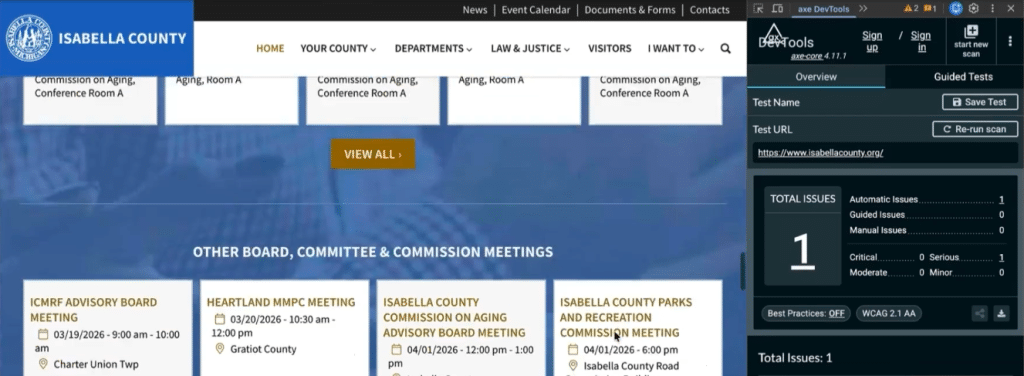
Deque’s axe Dev Tools is a helpful tool to assess accessibility on your site.
For many organizations, the first step is to understand where your website standard today. Accessibility testing can help identify gaps and give you a clearer picture of what to address.
There are a number of automated tools that can quickly surface common issues. Tools like WAVE and axe DevTools integrate directly into your browser and highlight accessibility concerns as you navigate your site. These can be incredibly helpful for spotting things like missing alt text, structural issues, or contrast problems. Manual testing is also important, and can show if your site is navigable using a keyboard or screenreader.

WAVE is another helpful tool for assessing your site’s accessibility, and offers a more visual view.
Here are a few of the common and helpful tools to test your website for accessibility yourself:
- WAVE: A free browser-based tool that highlights accessibility issues directly on your page.
- Deque axe DevTools: A more advanced browser extension that provides deeper insights, especially useful for developers.
- Contrast Checkers: Tools that evaluate whether your text meets required color contrast ratios.
- Keyboard Navigation: Use the Tab key to navigate your site. Can you access menus, forms, and links without a mouse?
- Screen Reader / Voiceover Testing: Tools like VoiceOver (Mac) or NVDA (Windows) simulate how visually impaired users experience your site.
- Zoom Testing: Zoom your browser to 200% or more to see if content remains readable and usable.
These tools and exercises can quickly reveal important usability issues and can show how real users experience your site.
Most Common Compliance Issues
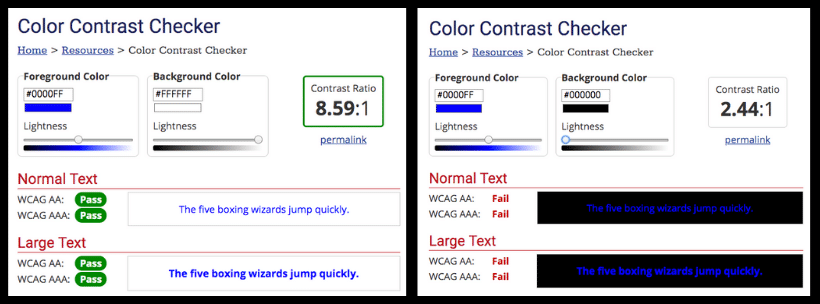
Inadequate color contrast is a common accessibility issue, though it’s easy to test for and fix.
Accessibility issues tend to show up in similar ways across many websites, especially those that haven’t been updated recently. Here are several of the most common accessibility issues to look for:
- No Alternative Text or Alt-Text for Pictures
- Link Text Doesn’t Convey the Links’ Meaning
- Color Contrast Isn’t Adequate
- Closed Captioning Isn’t Used on Video or Audio Messages
- Audio and Video Play Automatically on the Site
- Visitors are Unable to Click Through Navigation and Links
- Site Can’t Zoom or Magnify Effectively
- Keyboard Traps Prevent Users From Moving Through the Site
- PDF Documents are Scanned Copies and Not Readable with a Screenreader
- Forms Aren’t Operable or Understandable With a Screenreader or Similar Technology
How to Make Your Site Compliant
If your site hasn’t been updated in a while or accessibility hasn’t been a priority, there may be a long list of issues you need to correct. To make your site compliant, it’s important to take it step by step.
Start with the Big Picture
If your website has a large number of accessibility issues, it may not make sense to approach them one at a time. In those cases, a more comprehensive update or even a full redesign can be a more efficient and effective path forward.
Beyond accessibility, this also creates an opportunity to improve navigation, update outdated tools, and better organize your content overall.
Prioritize
Whether you have a lot of issues or a few, it’s important to prioritize. Start with the elements that have the biggest impact on usability, such as navigation, forms, and overall page structure. These are the components that allow users to move through your site and access essential information.
From there, you can move into content-level improvements like adding alt text to images, improving color contrast, and ensuring videos include captions. Important documents, especially those tied to key services, should also be prioritized to ensure they are accessible.
Consider Additional Services
It’s easy to focus only on your core website, but many public entities rely on third-party tools to deliver services. Payment systems, GIS platforms, and scheduling tools all play a role in the user experience and they need to be accessible as well.
Pay special attention to your PDF forms. You don’t have to make all of your PDFs accessible; it’s acceptable to archive any forms that are no longer used. Though not every historical document needs to be updated, anything that is still relevant or actively used should be reviewed and, if necessary, converted into an accessible format.
When to Bring in Help
Some accessibility improvements can be handled internally, especially those related to content updates. Others, particularly those involving code structure or more advanced functionality, may require technical expertise.
Working with a team that understands both accessibility standards and how your website is built can help ensure changes are implemented correctly and efficiently.
Making Your Site Accessible
Meeting ADA Title II accessibility requirements is about more than compliance; it’s about making sure every member of your community can access the information and services they rely on. With deadlines on the horizon, now is the time to evaluate your website, identify areas for improvement, and begin making progress. If you’re concerned about ADA compliance or aren’t sure where to start, get in touch with us. We’ll assess your site and give you a plan forward.